Release 2025.6.13

Mid-June 2025 update introducing enhanced collaboration workflows, improved quality trend analytics, expanded integration options, and streamlined workflow automation capabilities.

Rafael Osiro

Jun 13, 2025

3

min read

Table of Contents

Note

These notes catch up with several releases since our last published update on 2025.6.6 and are current as of the 2025.6.13 version of the platform.

Introducing Quality Check Dry Run

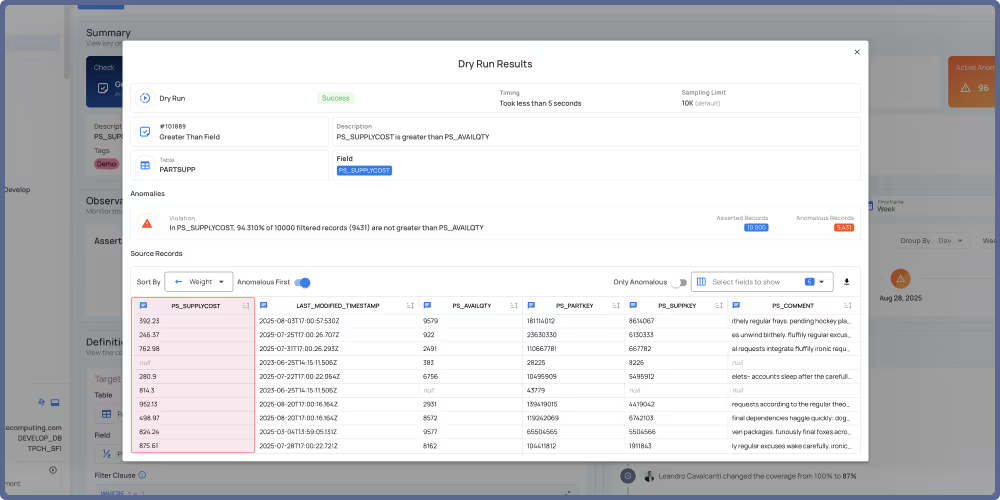
You can now test quality checks before applying them with the new Dry Run feature. Preview potential anomalies, check execution time, and review all configuration details in a dedicated modal. Results aren't saved to your system, making it safe to experiment and fine-tune checks before running them for real.
Introducing Anomaly Fingerprint Visualization

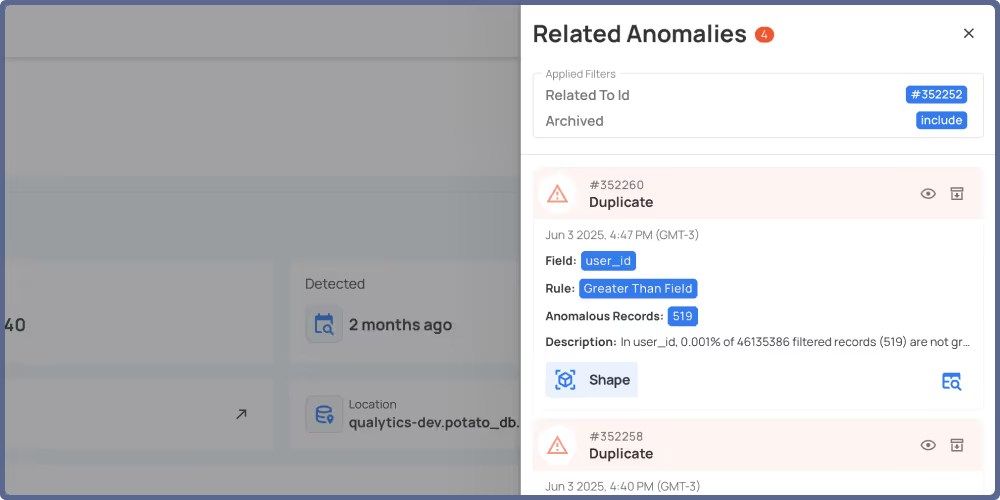
You can now view and manage all anomalies that share the same fingerprint. The new side panel shows related anomalies with their count and lets you acknowledge, archive, or view details without leaving the current page.
General Fixes and Improvements

Fixes (3)

  • Resolved an issue where metric charts failed to display data when users accessed metric details.
  • Fixed a bug that incorrectly allowed users to edit settings on computed fields inherited from parent computed files.
  • Corrected the rendering logic for Authored Check Details that prevented information from displaying after tag update operations.

Improvements (2)

  • Added sticky navigation to maintain access to controls while scrolling.
  • Added support for Iceberg Tables for Scan Operation.

As usual, our User Guide and accompanying Change Log captures more details about this release.

No items found.

Related Articles

Related News

Discover More From Qualytics.

Join the companies using Qualytics to make data quality proactive, automated, and shared across business and data teams.


Release 2025.6.13

Mid-June 2025 update introducing enhanced collaboration workflows, improved quality trend analytics, expanded integration options, and streamlined workflow automation capabilities.

Rafael Osiro

Jun 13, 2025

3

min read

About the Customer

Note

These notes catch up with several releases since our last published update on 2025.6.6 and are current as of the 2025.6.13 version of the platform.

Introducing Quality Check Dry Run

You can now test quality checks before applying them with the new Dry Run feature. Preview potential anomalies, check execution time, and review all configuration details in a dedicated modal. Results aren't saved to your system, making it safe to experiment and fine-tune checks before running them for real.

Introducing Anomaly Fingerprint Visualization

You can now view and manage all anomalies that share the same fingerprint. The new side panel shows related anomalies with their count and lets you acknowledge, archive, or view details without leaving the current page.

General Fixes and Improvements

Fixes (3)

  • Resolved an issue where metric charts failed to display data when users accessed metric details.
  • Fixed a bug that incorrectly allowed users to edit settings on computed fields inherited from parent computed files.
  • Corrected the rendering logic for Authored Check Details that prevented information from displaying after tag update operations.

Improvements (2)

  • Added sticky navigation to maintain access to controls while scrolling.
  • Added support for Iceberg Tables for Scan Operation.

As usual, our User Guide and accompanying Change Log captures more details about this release.

More case studies you might like

Discover More From Qualytics.

Release 2025.6.13

Mid-June 2025 update introducing enhanced collaboration workflows, improved quality trend analytics, expanded integration options, and streamlined workflow automation capabilities.

Note

These notes catch up with several releases since our last published update on 2025.6.6 and are current as of the 2025.6.13 version of the platform.

Introducing Quality Check Dry Run

You can now test quality checks before applying them with the new Dry Run feature. Preview potential anomalies, check execution time, and review all configuration details in a dedicated modal. Results aren't saved to your system, making it safe to experiment and fine-tune checks before running them for real.

Introducing Anomaly Fingerprint Visualization

You can now view and manage all anomalies that share the same fingerprint. The new side panel shows related anomalies with their count and lets you acknowledge, archive, or view details without leaving the current page.

General Fixes and Improvements

Fixes (3)

  • Resolved an issue where metric charts failed to display data when users accessed metric details.
  • Fixed a bug that incorrectly allowed users to edit settings on computed fields inherited from parent computed files.
  • Corrected the rendering logic for Authored Check Details that prevented information from displaying after tag update operations.

Improvements (2)

  • Added sticky navigation to maintain access to controls while scrolling.
  • Added support for Iceberg Tables for Scan Operation.

As usual, our User Guide and accompanying Change Log captures more details about this release.

More videos you might like

Discover More From Qualytics.