Release 2024.04.19

Mid-April 2024 update delivering advanced filtering capabilities, improved scan scheduling options, enhanced metadata extraction, and critical bug fixes for stability.

Eric Simmerman

CTO & Co-Founder

Apr 20, 2024

3

min read

Table of Contents

Note

These notes catch up with several releases since our last published update on 2024.04.12 and are current as of the 2024.04.19 version of the platform.

Note

Breaking Changes

  • Remediation Naming Convention Update:
  • Updated the naming convention for remediation to {enrich_container_prefix}_remediation_{container_id}, standardizing remediation identifiers.
  • Add file extension for DFS Enrichment:
  • Introduced .delta extension to files in the enrichment process on DFS, aligning with data handling standards.

Feature Enhancements

Revamp Enrichment Datastore Main Page:

  • Tree View & Data Navigation: Enhanced the enrichment page with an updated tree view that now lists source datastores linked to enrichment datastores, improving navigability. A newly introduced page for enrichment datastore enables:
  • Data preview across enrichment, remediation, and metadata tables with the ability to apply “WHERE” filters for targeted insights.
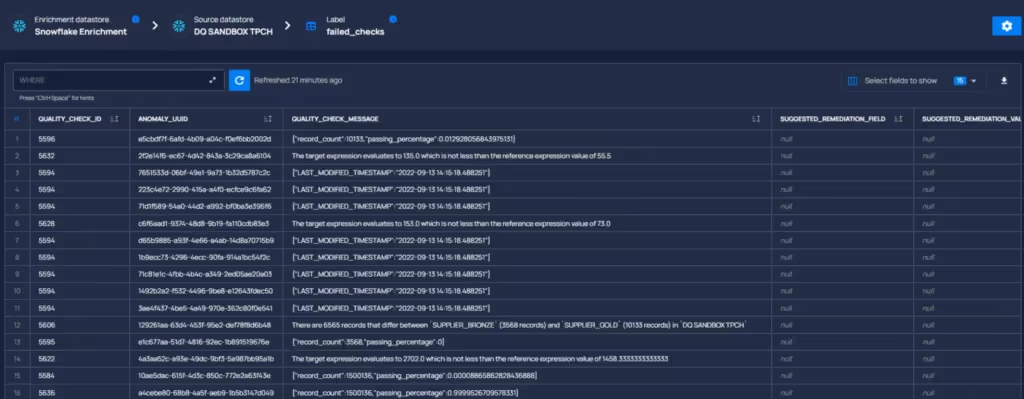
  • Direct downloading of preview data as CSV.
  • UI Performance Optimization: Implemented UI caching to boost performance, reducing unnecessary network requests and smoothly preserving user-inputted filters and recent data views.

User Sorting By Role:

  • Introduced a sorting feature in the Settings > Users tab, allowing users to be sorted by their roles in ascending or descending order, facilitating easier user management.

Expanded Entity Interaction Options:

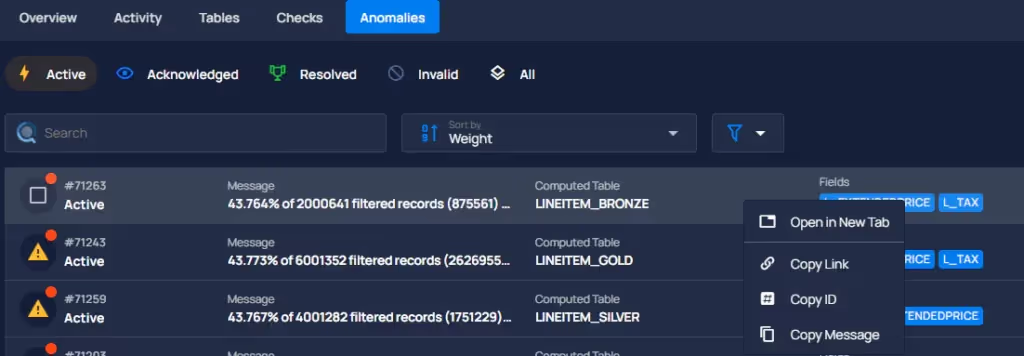
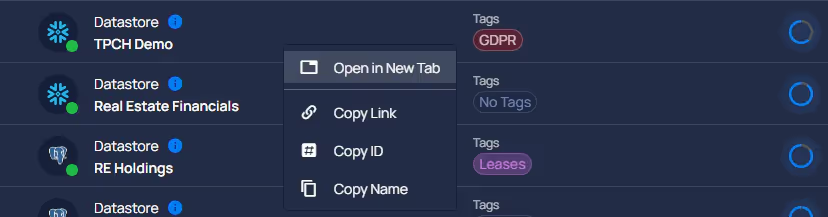
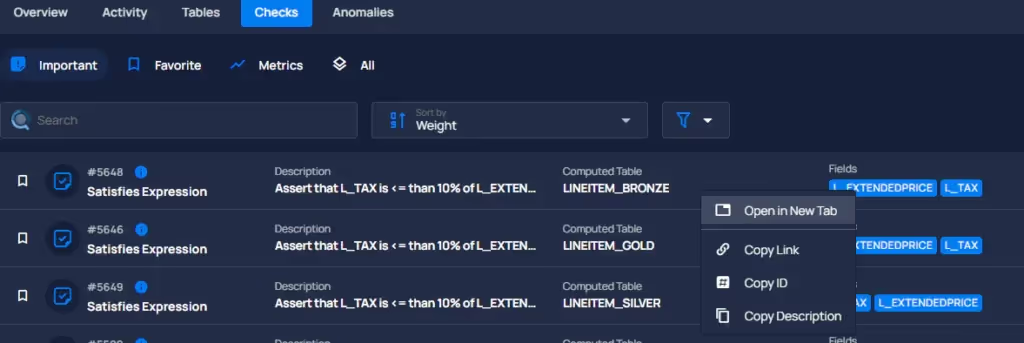
  • Enhanced entity lists and breadcrumbs with new direct action capabilities. Users can now right-click on an item to access useful functions: copy the entity’s ID or name, open the entity’s link in a new tab, and copy the entity’s link. This enhancement simplifies data management by making essential actions more accessible.

General Fixes

Record Quality Scores Overlap Correction:

  • Resolved a problem where multiple violations could be opened for the same container simultaneously, contrary to logic. This fix ensures violations for containers are uniquely recorded, eliminating parallel open violations.

Anomaly Details Text Overflow:

  • Corrected text overflow issues in the anomaly details’ violation box, ensuring all content is properly contained and readable.

Enhanced “Not Found” Warnings With Quick Filters:

  • Improved user guidance for Checks and Anomalies list filters by adding hints for “not found” items, suggesting users check the “all” group for unfiltered search results, and clarifying navigation and search results.
  • General Fixes and Improvements

As usual, our User Guide and accompanying Change Log captures more details about this release.

No items found.

Related Articles

Related News

Discover More From Qualytics.

Join the companies using Qualytics to make data quality proactive, automated, and shared across business and date teams.

Release 2024.04.19

Mid-April 2024 update delivering advanced filtering capabilities, improved scan scheduling options, enhanced metadata extraction, and critical bug fixes for stability.

Eric Simmerman

CTO & Co-Founder

Apr 20, 2024

3

min read

About the Customer

Note

These notes catch up with several releases since our last published update on 2024.04.12 and are current as of the 2024.04.19 version of the platform.

Note

Breaking Changes

  • Remediation Naming Convention Update:
  • Updated the naming convention for remediation to {enrich_container_prefix}_remediation_{container_id}, standardizing remediation identifiers.
  • Add file extension for DFS Enrichment:
  • Introduced .delta extension to files in the enrichment process on DFS, aligning with data handling standards.

Feature Enhancements

Revamp Enrichment Datastore Main Page:

  • Tree View & Data Navigation: Enhanced the enrichment page with an updated tree view that now lists source datastores linked to enrichment datastores, improving navigability. A newly introduced page for enrichment datastore enables:
  • Data preview across enrichment, remediation, and metadata tables with the ability to apply “WHERE” filters for targeted insights.
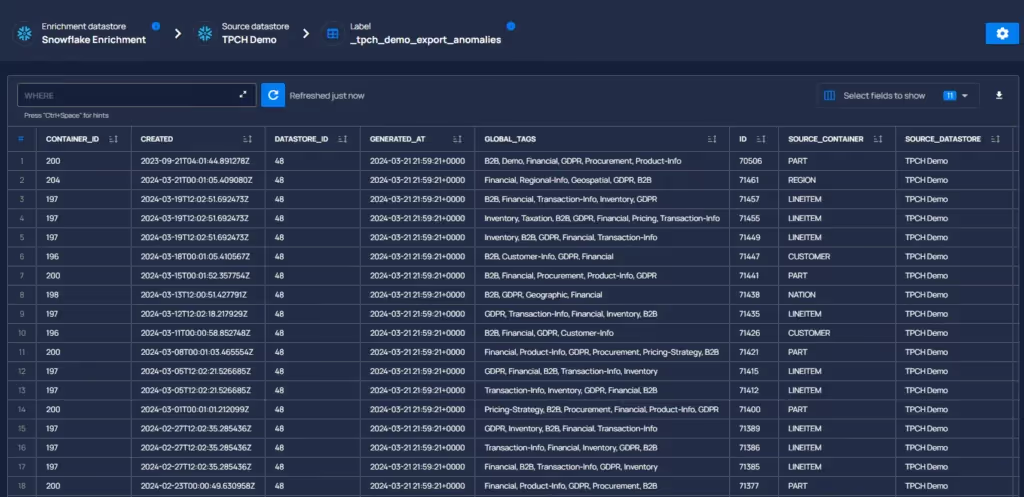
  • Direct downloading of preview data as CSV.
  • UI Performance Optimization: Implemented UI caching to boost performance, reducing unnecessary network requests and smoothly preserving user-inputted filters and recent data views.

User Sorting By Role:

  • Introduced a sorting feature in the Settings > Users tab, allowing users to be sorted by their roles in ascending or descending order, facilitating easier user management.

Expanded Entity Interaction Options:

  • Enhanced entity lists and breadcrumbs with new direct action capabilities. Users can now right-click on an item to access useful functions: copy the entity’s ID or name, open the entity’s link in a new tab, and copy the entity’s link. This enhancement simplifies data management by making essential actions more accessible.

General Fixes

Record Quality Scores Overlap Correction:

  • Resolved a problem where multiple violations could be opened for the same container simultaneously, contrary to logic. This fix ensures violations for containers are uniquely recorded, eliminating parallel open violations.

Anomaly Details Text Overflow:

  • Corrected text overflow issues in the anomaly details’ violation box, ensuring all content is properly contained and readable.

Enhanced “Not Found” Warnings With Quick Filters:

  • Improved user guidance for Checks and Anomalies list filters by adding hints for “not found” items, suggesting users check the “all” group for unfiltered search results, and clarifying navigation and search results.
  • General Fixes and Improvements

As usual, our User Guide and accompanying Change Log captures more details about this release.

More case studies you might like

Discover More From Qualytics.

Release 2024.04.19

Mid-April 2024 update delivering advanced filtering capabilities, improved scan scheduling options, enhanced metadata extraction, and critical bug fixes for stability.

Note

These notes catch up with several releases since our last published update on 2024.04.12 and are current as of the 2024.04.19 version of the platform.

Note

Breaking Changes

  • Remediation Naming Convention Update:
  • Updated the naming convention for remediation to {enrich_container_prefix}_remediation_{container_id}, standardizing remediation identifiers.
  • Add file extension for DFS Enrichment:
  • Introduced .delta extension to files in the enrichment process on DFS, aligning with data handling standards.

Feature Enhancements

Revamp Enrichment Datastore Main Page:

  • Tree View & Data Navigation: Enhanced the enrichment page with an updated tree view that now lists source datastores linked to enrichment datastores, improving navigability. A newly introduced page for enrichment datastore enables:
  • Data preview across enrichment, remediation, and metadata tables with the ability to apply “WHERE” filters for targeted insights.

  • Direct downloading of preview data as CSV.

  • UI Performance Optimization: Implemented UI caching to boost performance, reducing unnecessary network requests and smoothly preserving user-inputted filters and recent data views.

User Sorting By Role:

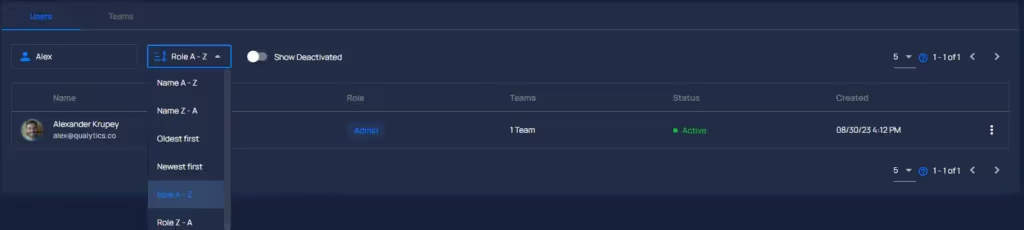
  • Introduced a sorting feature in the Settings > Users tab, allowing users to be sorted by their roles in ascending or descending order, facilitating easier user management.
Expanded Entity Interaction Options:

  • Enhanced entity lists and breadcrumbs with new direct action capabilities. Users can now right-click on an item to access useful functions: copy the entity’s ID or name, open the entity’s link in a new tab, and copy the entity’s link. This enhancement simplifies data management by making essential actions more accessible.
General Fixes

Record Quality Scores Overlap Correction:

  • Resolved a problem where multiple violations could be opened for the same container simultaneously, contrary to logic. This fix ensures violations for containers are uniquely recorded, eliminating parallel open violations.

Anomaly Details Text Overflow:

  • Corrected text overflow issues in the anomaly details’ violation box, ensuring all content is properly contained and readable.

Enhanced “Not Found” Warnings With Quick Filters:

  • Improved user guidance for Checks and Anomalies list filters by adding hints for “not found” items, suggesting users check the “all” group for unfiltered search results, and clarifying navigation and search results.
  • General Fixes and Improvements

As usual, our User Guide and accompanying Change Log captures more details about this release.

More videos you might like

Discover More From Qualytics.