Release 2023.10.09

Early October 2023 release delivering platform stability enhancements, new validation rules, improved data profiling capabilities, and resolved user-reported issues.

Eric Simmerman

CTO & Co-Founder

Oct 8, 2023

3

min read

Table of Contents

Feature Enhancements

Prioritized Check Categorizations

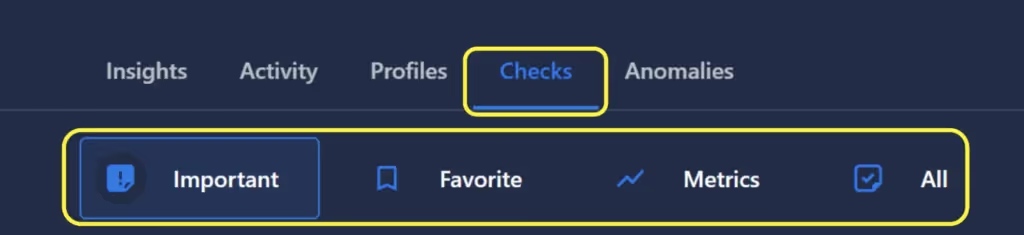
  • We have added additional control over how Checks are displayed in the UI, giving users the ability to more easily find the ones most relevant to their current task. While we previously (and continue to) support sorting and filtering by several criteria (including tags), this proved insufficient for navigating large numbers of checks. To mitigate this, we now group checks into 4 categories:
  • Important: This displays all authored checks, and all automatically inferred checks that currently have an active anomaly. It also includes all checks with a sufficient associated weighting (currently set at 7. We plan to give users the ability to define this threshold in a future release).
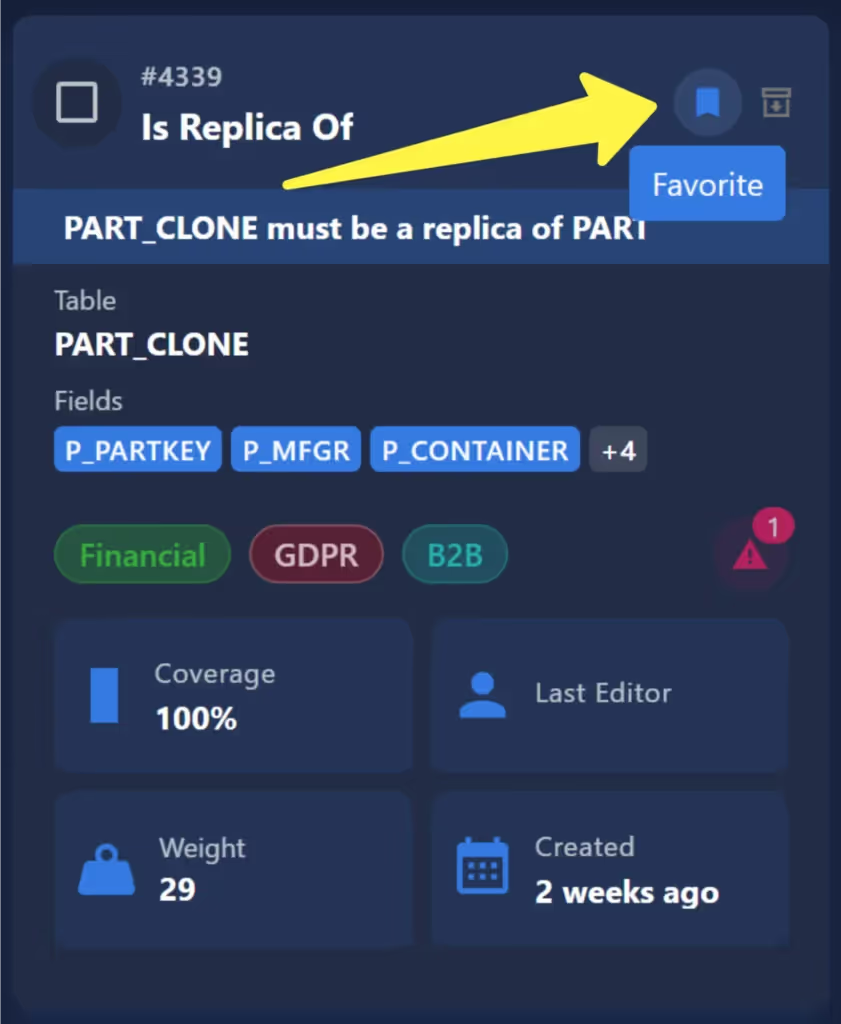
  • Favorite: Includes only checks that have been marked as “Favorite.” Since Favorites are not global designations, this view will be unique for each individual user. In case you haven’t used Favorites in the past, this designation can be toggled in the upper right of the check card:
  • Metrics: Displays the time-series charts of all metric checks.
  • All: Includes the entire population of checks.
Simplified Status Filter For Displaying Anomalies

  • We have added a navigation bar to the Anomalies tab, which allows users to easily view them by their current status.

Notification Testing

  • Previously, in order to test a notification, users were required to force the system to generate a representative anomaly. This created a cumbersome, tedious process, and made for a frustrating troubleshooting experience.
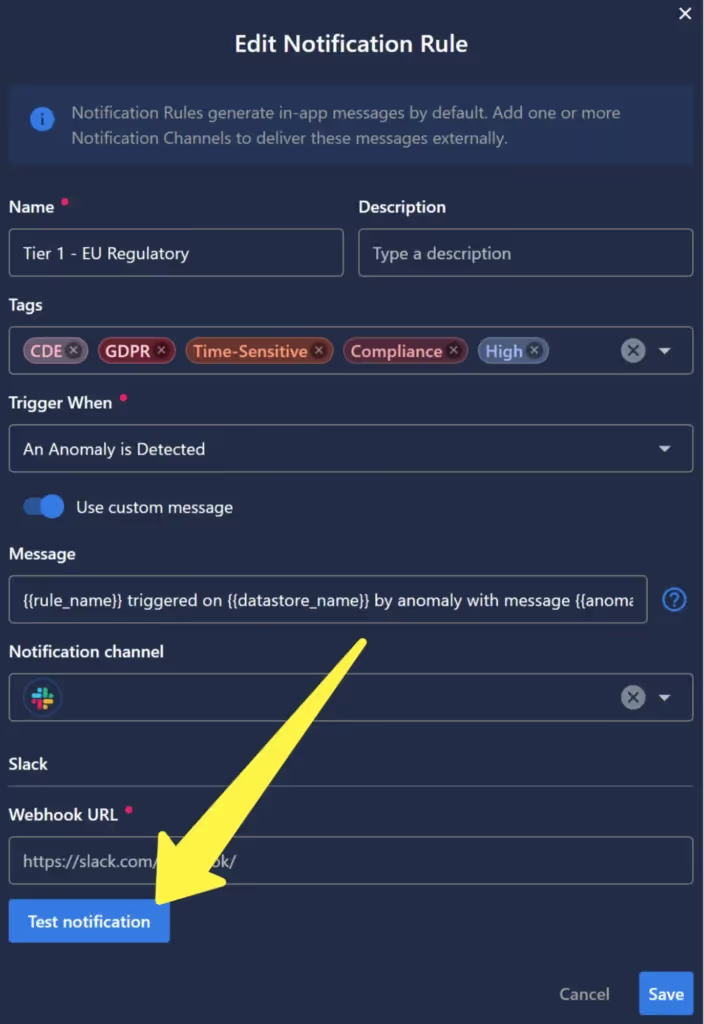
  • To remedy this, we have added a “Test notification” button to the notification interface, which will trigger the notification on command. We will also display any error messages that the system receives in the event of a failure, significantly streamlining the testing and validation process.
Export Metadata Directly To Enrichment Datastore

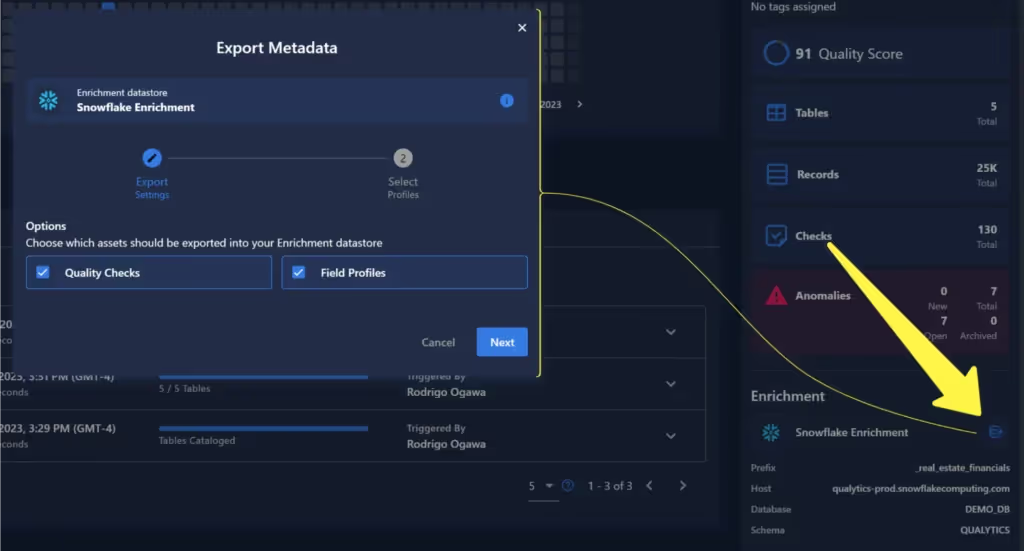
  • Previously, access to metadata was available exclusively via API. Based on user feedback, we have leveraged our existing enrichment capabilities to support this functionality In-App, eliminating the need to write code to obtain this information at scale.
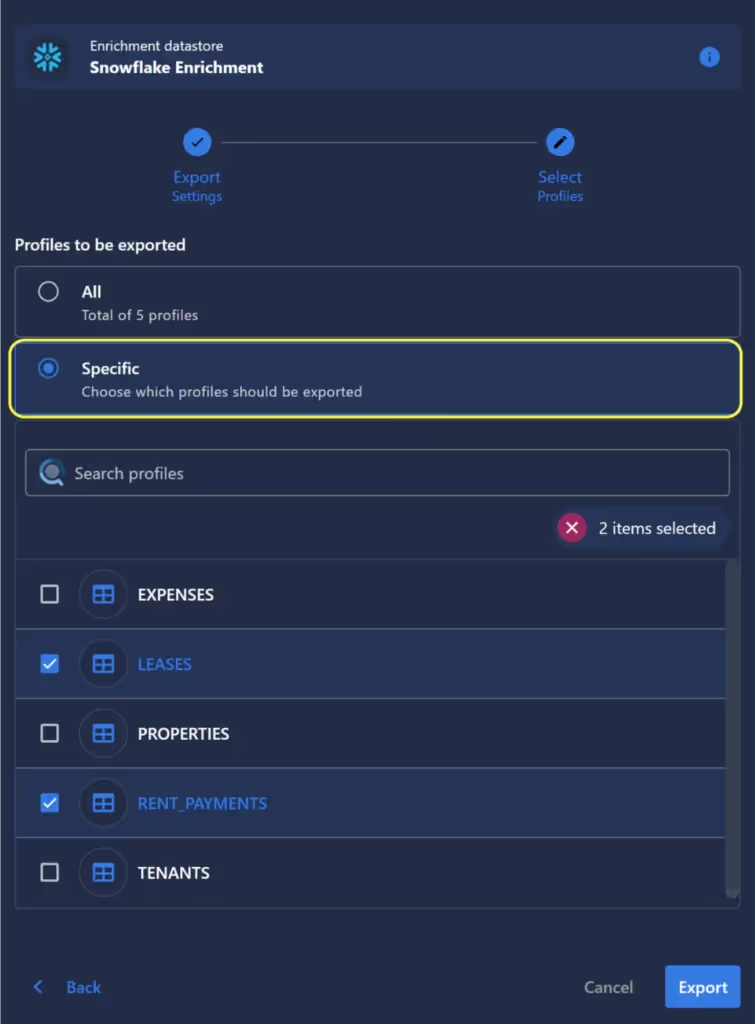
  • Additionally, users have complete control over what metadata is exported. In the Export interface, users can select metadata pertaining to Checks, Profiles, or both, and further refine the extraction criteria by specifying individual tables, ensuring that only relevant information is written to the enrichment store.
As usual, our User Guide and accompanying Change Log captures more details about this release.

No items found.

Related Articles

Related News

Discover More From Qualytics.

Join the companies using Qualytics to make data quality proactive, automated, and shared across business and date teams.


Release 2023.10.09

Early October 2023 release delivering platform stability enhancements, new validation rules, improved data profiling capabilities, and resolved user-reported issues.

Eric Simmerman

CTO & Co-Founder

Oct 8, 2023

3

min read

About the Customer

Feature Enhancements

Prioritized Check Categorizations

  • We have added additional control over how Checks are displayed in the UI, giving users the ability to more easily find the ones most relevant to their current task. While we previously (and continue to) support sorting and filtering by several criteria (including tags), this proved insufficient for navigating large numbers of checks. To mitigate this, we now group checks into 4 categories:
  • Important: This displays all authored checks, and all automatically inferred checks that currently have an active anomaly. It also includes all checks with a sufficient associated weighting (currently set at 7. We plan to give users the ability to define this threshold in a future release).
  • Favorite: Includes only checks that have been marked as “Favorite.” Since Favorites are not global designations, this view will be unique for each individual user. In case you haven’t used Favorites in the past, this designation can be toggled in the upper right of the check card:
  • Metrics: Displays the time-series charts of all metric checks.
  • All: Includes the entire population of checks.

Simplified Status Filter For Displaying Anomalies

  • We have added a navigation bar to the Anomalies tab, which allows users to easily view them by their current status.

Notification Testing

  • Previously, in order to test a notification, users were required to force the system to generate a representative anomaly. This created a cumbersome, tedious process, and made for a frustrating troubleshooting experience.
  • To remedy this, we have added a “Test notification” button to the notification interface, which will trigger the notification on command. We will also display any error messages that the system receives in the event of a failure, significantly streamlining the testing and validation process.

Export Metadata Directly To Enrichment Datastore

  • Previously, access to metadata was available exclusively via API. Based on user feedback, we have leveraged our existing enrichment capabilities to support this functionality In-App, eliminating the need to write code to obtain this information at scale.
  • Additionally, users have complete control over what metadata is exported. In the Export interface, users can select metadata pertaining to Checks, Profiles, or both, and further refine the extraction criteria by specifying individual tables, ensuring that only relevant information is written to the enrichment store.

As usual, our User Guide and accompanying Change Log captures more details about this release.

More case studies you might like

Discover More From Qualytics.

Release 2023.10.09

Early October 2023 release delivering platform stability enhancements, new validation rules, improved data profiling capabilities, and resolved user-reported issues.

Feature Enhancements

Prioritized Check Categorizations

  • We have added additional control over how Checks are displayed in the UI, giving users the ability to more easily find the ones most relevant to their current task. While we previously (and continue to) support sorting and filtering by several criteria (including tags), this proved insufficient for navigating large numbers of checks. To mitigate this, we now group checks into 4 categories:
  • Important: This displays all authored checks, and all automatically inferred checks that currently have an active anomaly. It also includes all checks with a sufficient associated weighting (currently set at 7. We plan to give users the ability to define this threshold in a future release).
  • Favorite: Includes only checks that have been marked as “Favorite.” Since Favorites are not global designations, this view will be unique for each individual user. In case you haven’t used Favorites in the past, this designation can be toggled in the upper right of the check card:
  • Metrics: Displays the time-series charts of all metric checks.
  • All: Includes the entire population of checks.

Simplified Status Filter For Displaying Anomalies

  • We have added a navigation bar to the Anomalies tab, which allows users to easily view them by their current status.

Notification Testing

  • Previously, in order to test a notification, users were required to force the system to generate a representative anomaly. This created a cumbersome, tedious process, and made for a frustrating troubleshooting experience.
  • To remedy this, we have added a “Test notification” button to the notification interface, which will trigger the notification on command. We will also display any error messages that the system receives in the event of a failure, significantly streamlining the testing and validation process.

Export Metadata Directly To Enrichment Datastore

  • Previously, access to metadata was available exclusively via API. Based on user feedback, we have leveraged our existing enrichment capabilities to support this functionality In-App, eliminating the need to write code to obtain this information at scale.
  • Additionally, users have complete control over what metadata is exported. In the Export interface, users can select metadata pertaining to Checks, Profiles, or both, and further refine the extraction criteria by specifying individual tables, ensuring that only relevant information is written to the enrichment store.

As usual, our User Guide and accompanying Change Log captures more details about this release.

More videos you might like

Discover More From Qualytics.